
Free Typing Certificate — Download Proof of Your Typing Speed
Get a free, personalized typing certificate showing your WPM, accuracy, and the date — generated automatically after any typing test on this site. Download it as a PNG or PDF and use it for job applications, school assignments, or your resume. No signup, no watermark, no cost.
How to Get Your Typing Certificate
- Take any typing speed test on this site.
- When your results appear, click Get Certificate.
- Enter your name as you’d like it to appear.
- Download the certificate as a PNG or PDF.
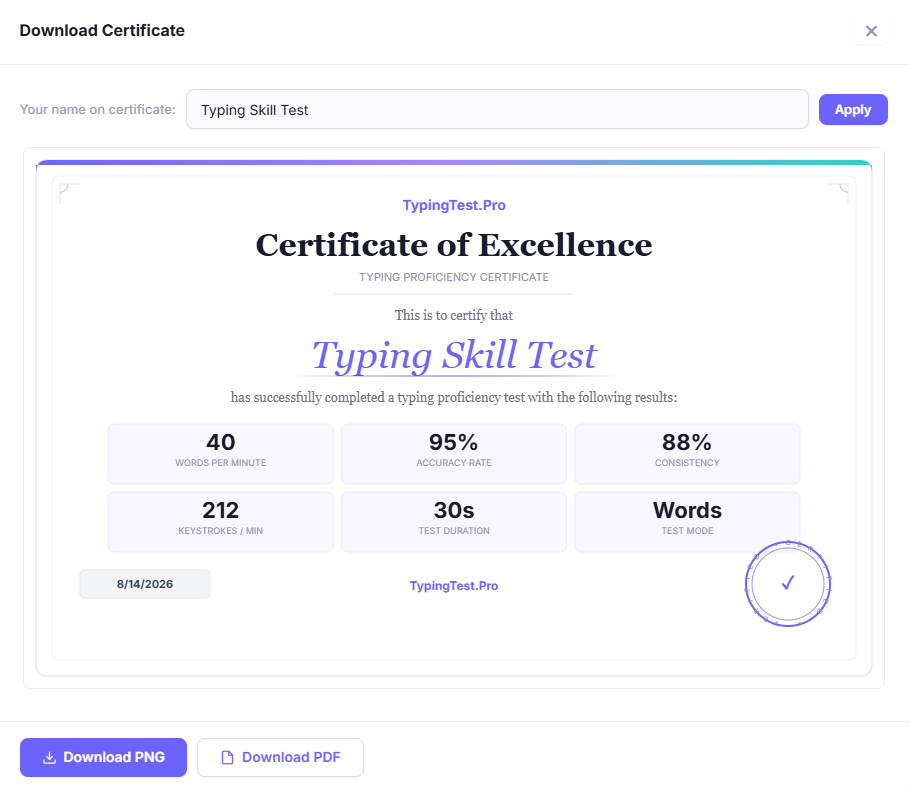
The certificate includes your WPM, accuracy percentage, test date, and duration — everything most employers or teachers ask to see as proof of typing speed.
Why a Typing Certificate Matters
A typing certificate is quick, verifiable proof of your typing speed that's easy to attach to a job application, upload to a portfolio, or submit for a class requirement. Instead of writing "I type around 60 WPM" on a resume with no way to confirm it, a certificate with your actual test date, WPM, and accuracy gives a hiring manager or teacher something concrete to check. This matters most for roles where typing speed is an explicit requirement — data entry, transcription, administrative assistant, and customer support positions frequently list a minimum WPM in the job posting, and some ask for documented proof.
What's Included on the Certificate
- Your name (as entered)
- WPM (words per minute) from your test result
- Accuracy percentage
- Test date
- Test duration (1 minute, 5 minutes, etc.)
Which Test Should You Take First?
| If You Need... | Take This Test |
|---|---|
| The most widely recognized benchmark | 1 Minute Typing Test |
| A job-application-ready result | 5 Minute Typing Test |
| A quick peak-speed check | 30 Second Typing Test |
| A longer, more rigorous test | 10 Minute Typing Test |
Is This Typing Certificate Official or Accredited?
Tips for a Strong Certificate Result
Warm up first.
Take a practice test before your "real" one — cold-start results are usually a few WPM lower than your actual speed.
Prioritize accuracy over speed.
A certificate showing 55 WPM at 98% accuracy is more credible than 70 WPM at 85% — most employers weight accuracy heavily.
Warm up first.
Test in a quiet environment to avoid the kind of interruptions that inflate your error count.
Retake it periodically.
If you're actively improving your typing, generate a fresh certificate every few weeks rather than relying on an old score.
More Free Tools
| # | Tool | Best For |
|---|---|---|
| 1 | 1 Minute Typing Test | The most common test to certify from. |
| 2 | WPM Calculator | Calculate your words per minute. |
| 3 | Typing Accuracy Calculator | Calculate your typing accuracy percentage. |
| 4 | Typing Practice | Build speed before testing. |
Frequently Asked Questions
Is the typing certificate really free?
Yes — no signup, no payment, and no watermark on the download.
Can I use this certificate for a job application?
Yes, as supporting evidence of your typing speed. It’s not an accredited credential, so check the job posting if it specifically requires a certified typing test from a particular provider.
What format does the certificate download in?
PNG and PDF are both available.
Can I generate more than one certificate?
Yes — take the test again anytime and generate a new certificate with your updated score.
Does the certificate expire?
No, but employers may expect a recent test date, so it’s worth retesting if your last certificate is more than a few months old.