
Typing Practice — Learn to Type Faster
Typing Practice
Learn to type faster, one lesson at a time.
F and J
Rest your index fingers on F and J — feel the bumps.
Lesson complete!
Nice work — ready for the next one?
How It Works
- Pick a lesson — locked lessons unlock as you complete earlier ones.
- Check the finger-position guide before you start.
- Type the letters, words, or sentences shown on screen.
- Watch your WPM, accuracy, and completion % update live as you type.
- Correct mistakes carefully instead of rushing past them.
- Earn 1–3 stars based on your speed and accuracy for that lesson.
- Move to the next lesson, or restart the current one for a better score.
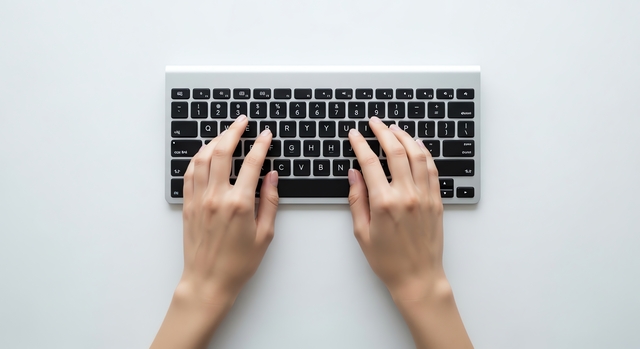
Lesson Curriculum
| Category | What You'll Practice |
|---|---|
| Home Row | A S D F / J K L ; — your typing home base |
| Top Row | Q W E R T / Y U I O P |
| Bottom Row | Z X C V B / N M , . / |
| Numbers | Full number row, 0–9 |
| Symbols | Shifted symbols and punctuation |
| Words | Common English words |
| Sentences | Full sentences with punctuation |
| Paragraphs | Connected multi-sentence text |
| Programming | Brackets, operators, and code syntax |
| Common professional email phrases | |
| Business Letters | Formal business writing phrases |
What Each Category Covers
Home Row (4 lessons).
The foundation of touch typing. Your fingers rest on A S D F and J K L ; between every keystroke, and every other key on the keyboard is reached by moving out from — then back to — this position. Lessons start with F and J (the two keys with raised bumps you can find without looking), then expand to the full left-hand and right-hand row, then combine both into short home-row-only words.
Top Row (3 lessons).
Q W E R T Y U I O P sits just above the home row and requires your fingers to stretch upward while keeping the rest of your hand anchored. This is where most beginners start lifting their whole hand instead of just the finger — these lessons are designed to catch that habit early.
Bottom Row (3 lessons).
Z X C V B and N M , . / sit below the home row. Because these keys are used less often in everyday English, they're also the ones typists tend to fumble months into practicing — dedicated repetition here closes that gap.
Numbers (3 lessons).
The number row (1–0) sits above the letter rows and uses a different finger-to-key mapping than most people expect. These lessons cover the left side, right side, and mixed number sequences you'd see in dates, prices, and IDs.
Symbols (2 lessons).
Shifted symbols (!@#$%) and punctuation (commas, periods, quotation marks) round out everyday typing — most typing tests and real-world writing use these constantly, but they're rarely practiced deliberately.
Words, Sentences & Paragraphs (4 lessons).
Once the individual keys are comfortable, these lessons shift to real text — common English words, full sentences with punctuation, and a connected paragraph — so you're practicing the rhythm of continuous typing, not just isolated keys.
Programming (2 lessons).
Brackets, operators, and a short code snippet — useful specifically for developers, since general typing tests rarely include the symbol-heavy syntax code actually requires.
Email & Business Letters (2 lessons).
Practical, professional phrasing you'd actually type at work — useful for building speed on the kind of writing you'll do most often in an office job.
Why Structured Practice Works Better Than Random Typing
Typing is a motor skill, not a knowledge skill — it improves through repetition of specific finger movements, not through understanding where the keys are. Random practice (just typing whatever comes to mind) reinforces whatever habits you already have, good or bad, because there’s no deliberate sequence correcting them. A structured curriculum does three things random practice doesn’t:
Introduces keys in a deliberate order
Starting from the home row so your fingers always have a "base" to return to between keystrokes, rather than learning key positions in whatever order you happen to encounter them.
Isolates weak spots
If a particular finger or key combination is holding back your speed, a dedicated lesson for it fixes the problem directly instead of hoping it improves through general typing, where you can unconsciously avoid your weak keys by choosing easier words.
Builds in measurable checkpoints
Because each lesson is short and scored, you get frequent, specific feedback (this lesson: 85% accuracy) instead of a vague sense of "I think I'm getting better," which makes it much easier to notice regressions or plateaus early.
Common Mistakes That Slow Beginners Down
Looking at the keyboard.
This is the single biggest speed blocker for self-taught typists — every glance down breaks your reading rhythm and adds a full second or more per correction.
Using the wrong finger for a key because it's faster right now.
This feels like a shortcut but prevents the muscle memory that produces real speed later — the correct finger is slower today and faster in a month.
Chasing speed before accuracy is consistent.
A typist who rushes and racks up errors ends up slower overall once you account for corrections, and reinforces careless habits that are hard to undo.
Skipping the home row because it feels "too easy."
Every other lesson assumes your fingers return here automatically between keystrokes — skipping it undermines everything that follows.
Tips for Better Practice
Keep fingers on the home row
Keep fingers on the home row (A S D F / J K L ;) between keystrokes — reach out, type, return.
Focus on accuracy first.
Speed that comes from sloppy habits creates an accuracy ceiling that's hard to undo later. Slow down until your error rate drops, then build speed back up.
Practice in short, daily sessions.
10–15 minutes every day produces faster, more durable improvement than one long session once a week — motor memory consolidates during the rest between sessions, not during the session itself.
Don't look at the keyboard.
It feels slower at first; the habit change pays off within a couple of weeks.
Repeat lessons that feel shaky
Even after unlocking the next one. A lesson completed at 2 stars is worth retrying before moving on.
Who This Helps
Complete beginners
Complete beginners building foundational finger placement from scratch.
Self-taught typists
Self-taught typists who type reasonably fast but with poor form, hunting for keys or looking down often — structured drills correct the habits that cap their speed.
Students and job seekers
Students and job seekers who want a measurable way to track improvement before a typing assessment.
Developers
Developers who want dedicated practice on brackets, operators, and code syntax that general typing tests skip.
Typing Speed Benchmarks While You Practice
| Stage | Typical WPM | What It Means |
|---|---|---|
| Learning new keys | 5–15 WPM | Normal — focus entirely on correct finger placement. |
| Comfortable with the keyboard | 25–35 WPM | Basic fluency, ready for word- and sentence-level lessons. |
| Regular practice, a few weeks in | 40–55 WPM | Approaching the average adult typing speed. |
| Consistent daily practice, months in | 60+ WPM | Meets most office and administrative job requirements. |
More Free Tools
Test your speed after practicing.
Calculate your words per minute.
Calculate your typing accuracy.
Get a downloadable typing certificate.
Frequently Asked Questions
Is this typing practice free?
Yes — every lesson is free, with no signup or download required.
Should I focus on speed or accuracy first?
Accuracy. Increase speed only once you can complete a lesson with very few mistakes. Speed built on top of clean accuracy is durable; speed built on sloppy habits caps out quickly.
How often should I practice?
10–20 minutes on most days works better than one long weekly session, since typing improves through frequent repetition rather than total time spent.
What if I'm a complete beginner?
Start at Home Row (F and J) and work through the lessons in order — each one stays locked until you complete the lesson before it, so you can’t accidentally skip a foundational step.
Do I need to complete lessons in order?
For beginners, yes — the curriculum is locked progressively. If you already type comfortably, you can practice any unlocked lesson as many times as you like to sharpen specific weak spots.
How is my progress saved?
Your lesson progress, star ratings, and achievements are saved automatically in your browser, so they’re still there next time you visit.