
- How Fast You Actually Type
WPM Calculator Calculate Your Words Per Minute Instantly
Wondering how fast you actually type? Our free WPM calculator gives you an instant, accurate measure of your typing speed in words per minute, including both your gross WPM (raw speed) and net WPM (speed minus errors). No account, no download, no waiting. Just type and see your result. Whether you are preparing for a job interview, checking your progress after practice, or just curious how you compare to the average typist, this calculator gives you the number you need in under 60 seconds.
⏸ Test Paused
Click Resume or press Tab to continue
Your Typing Test Result
| DATE | WPM | ACCURACY | CONSISTENCY | KPS | MODE |
|---|
Test History (Last 10)
| DATE | WPM | ACCURACY | CONSISTENCY | KPS | MODE | CERT |
|---|
No test history yet. Complete a test to see your results here.
What Is WPM? (Words Per Minute Explained)
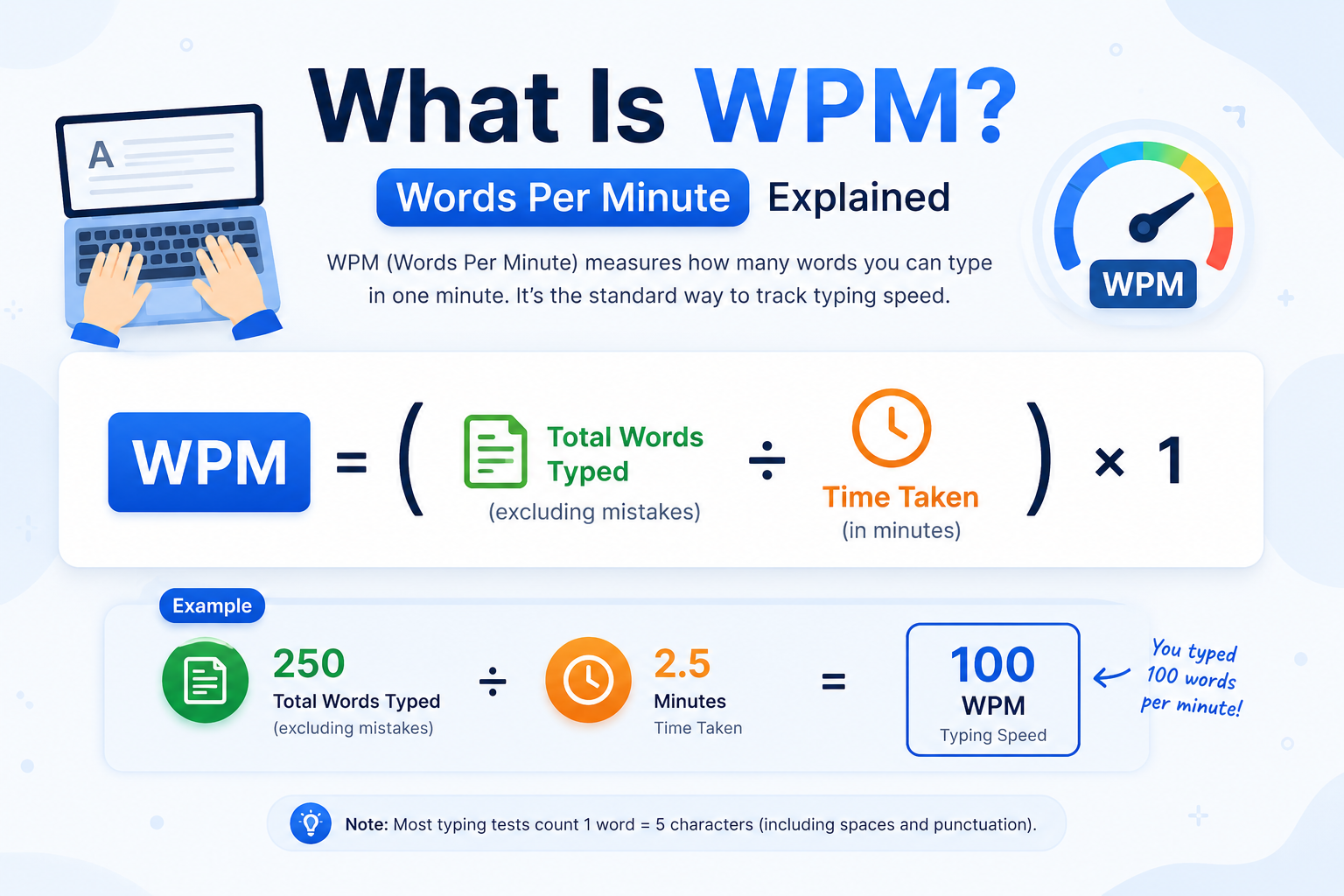
WPM stands for Words Per Minute the standard unit used to measure typing speed worldwide. It tells you how many words you can type in one minute under test conditions. Employers use it to evaluate job candidates, schools use it to track student progress, and typists use it to measure their own improvement over time.
One important thing to know: in typing speed calculator measurements, a “word” is not necessarily a real dictionary word. Instead, it is defined as any five characters including spaces, numbers, letters, and punctuation marks. This standardised definition makes WPM scores fair and comparable regardless of which words appear in your test passage.
How Is WPM Measured?
WPM is measured by counting the total number of characters you type during a timed session, dividing that count by five (to convert characters into “words”), and then dividing by the number of minutes elapsed. Most typing speed calculator or WPM calculator runs the tests for one minute, two minutes, or five minutes.
The result you see at the end of a typing test from our net WPM calculator is usually your net WPM, which accounts for errors. This gives a more honest picture of your productive typing speed than raw (gross) WPM alone.
Net WPM vs Gross WPM: What's the Difference?
Many typists see two numbers after a test and wonder what separates them. Here is the clear distinction:
Gross WPM | Net WPM | |
Definition | Your raw typing speed — counts ALL keystrokes including errors | Your effective typing speed — errors are subtracted from the score |
Errors included? | Yes — mistakes do not reduce your score | No — each uncorrected error reduces the result |
Best used for | Measuring maximum raw speed potential | Measuring real-world typing productivity |
Which do employers use? | Rarely — it flatters the typist | Always — it reflects accurate output quality |
Example | Typed 300 chars in 1 min = 60 gross WPM | 60 gross WPM minus 5 errors/min = 55 net WPM |
The takeaway: always focus on improving your net WPM. A fast-but-sloppy typist who makes 10 errors per minute is less productive than a slightly slower typist who types with high accuracy.
How to Calculate WPM: The Formula Explained
You do not need to do this math yourself our calculator handles it automatically. But understanding the formula helps you interpret your results and know exactly what you are measuring.
WPM Calculator Formula
Gross WPM Formula
Gross WPM = (Total Characters Typed ÷ 5) ÷ Minutes Elapsed
Example:
You typed 350 characters in 1 minute
Gross WPM = (350 ÷ 5) ÷ 1 = 70 WPM
Example (30-second test):
You typed 175 characters in 0.5 minutes
Gross WPM = (175 ÷ 5) ÷ 0.5 = 70 WPM
- The divisor of 5 represents the standardised length of one "word" in typing measurements. This convention was established so that typing short words like "I" or "a" doesn't inflate your score compared to typing longer words.
Net WPM Formula
Net WPM = Gross WPM − (Errors ÷ Minutes Elapsed)
Or equivalently:
Net WPM = ((Total Characters − (Errors × 5)) ÷ 5) ÷ Minutes
Example:
Gross WPM = 70, you made 4 uncorrected errors in 1 minute
Net WPM = 70 − (4 ÷ 1) = 66 WPM
- This is why accuracy and speed both matter. A 90 WPM typist who makes 15 errors per minute has an effective net WPM of only 75 — while a careful 80 WPM typist making 2 errors per minute achieves 78 net WPM and produces higher-quality output test now from our WPM calculator.
How to Use This WPM Calculator
Getting your WPM score with our WPM calculator takes less than two minutes. Follow these four steps:
Step 1
Choose your test duration. Select 1 minute for a standard result, 2 minutes for a more reliable average, or 5 minutes if you are preparing for a professional or government typing test.
Step 2
Click or tap the text area to begin. The timer starts the moment you type your first character.
Step 3
Type the passage as it appears on screen. Do not rush — focus on accuracy first, then speed. Backspace is allowed to correct mistakes before you move on.
Step 3
Type the passage as it appears on screen. Do not rush — focus on accuracy first, then speed. Backspace is allowed to correct mistakes before you move on.
What Is a Good WPM Score? Benchmarks by Role
WPM benchmarks vary by context. A score that is excellent for a casual user may be below-standard for a data entry professional. Use this table to see how your speed compares across different roles and experience levels.
Average WPM for Different Professions
| Category / Role | Typical WPM Range | Minimum WPM | Notes |
|---|---|---|---|
| Beginner (0–6 months) | 10–30 WPM | — | Learning phase — focus on accuracy, not speed |
| Average adult typist | 38–45 WPM | — | Typical casual computer user |
| High school student | 35–50 WPM | — | Benchmark for secondary education |
| University student | 50–65 WPM | — | Expected for academic productivity |
| Office / Admin worker | 50–65 WPM | 40 WPM | Minimum for most office roles |
| Data entry professional | 60–80 WPM | 60 WPM | Accuracy equally important as speed |
| Secretary / Admin assistant | 65–85 WPM | 60 WPM | Many jobs require 60–75 WPM minimum |
| Customer service representative | 55–70 WPM | 40 WPM | Accuracy critical for written communication |
| Journalist / Writer | 60–80 WPM | — | Speed aids productivity; style matters more |
| Legal / Medical secretary | 70–90 WPM | 65 WPM | High accuracy required for legal documents |
| Transcriptionist | 75–100 WPM | 75 WPM | Real-time transcription requires consistent speed |
| Court reporter (stenotype) | 180–225 WPM | 180 WPM | Uses specialised stenotype machine, not keyboard |
| Professional speed typist | 100–150 WPM | — | Top 1% of keyboard typists |
| World record (keyboard) | 212 WPM | — | Barbara Blackburn, 2005 Guinness World Record |
Source: Benchmarks are compiled from employer job posting requirements, HR industry standards, and educational typing program guidelines.
WPM Speed Tiers at a Glance
| WPM Range | Level | Percentile Est. | What This Means |
|---|---|---|---|
| Under 30 WPM | Beginner | Bottom 20% | Keep practicing — consider touch typing lessons. |
| 30 – 45 WPM | Below Average | 20th–40th Percentile | Average for casual users; below most job minimums. |
| 45 – 60 WPM | Average | 40th–65th Percentile | Meets most basic office role requirements. |
| 60 – 80 WPM | Above Average | 65th–85th Percentile | Comfortable for data entry and administrative roles. |
| 80 – 100 WPM | Fast | 85th–95th Percentile | Competitive for professional and specialist positions. |
| 100+ WPM | 🏆 Elite | Top 5% | Exceptional typing speed suitable for the most demanding roles. |
How to Improve Your WPM Score
If your WPM result is lower than you’d like, the good news is that typing speed improves rapidly with the right approach. Most people see measurable gains within two to three weeks of consistent, focused practice.
7 Proven Ways to Increase Your WPM
Learn touch typing.
If you currently hunt-and-peck with two or three fingers, switching to the ten-finger touch typing method is the single biggest speed upgrade available. It feels slow at first but produces dramatic gains within four to six weeks.
Use all ten fingers correctly.
Your left hand should rest on A-S-D-F and your right hand on J-K-L-semicolon. This is the home row position — every finger returns here between keystrokes.
Stop looking at the keyboard.
This is the hardest habit to break but the most important. Force yourself to look at the screen only, even when your error rate rises temporarily.
Practise accuracy before speed.
Deliberate, error-free practice builds muscle memory faster than rushing and making mistakes. Speed follows accuracy naturally.
Practise daily for 15–20 minutes.
Short, consistent sessions outperform occasional long sessions. Your motor cortex strengthens typing patterns through repetition over time.
Target your weak keys.
Our typing test shows an error heat map so you can identify which specific keys you mistype most. Drill those keys deliberately.
Take timed tests regularly.
Regular benchmarking keeps you motivated and shows you exactly how much you're improving. Aim to take a test at least three times per week.
WPM Speed Tiers at a Glance
| Tool | URL | What It Does |
|---|---|---|
| 1-Minute Typing Test | /1-minute-typing-test/ | The standard benchmark for WPM testing. |
| 5-Minute Typing Test | /5-minutes-typing-test/ | Best for job applications and data entry preparation. |
| Typing Certificate | /typing-certificate/ | Download a free certificate with your WPM score. |
| Typing Practice | /typing-practice/ | Drills and exercises designed to improve speed and accuracy. |
| Average Typing Speed Guide | /average-typing-speed/ | Compare your typing speed with population averages. |
Frequently Asked Questions About WPM Calculator
What does WPM stand for?
WPM stands for Words Per Minute. It is the standard unit used to measure typing speed. In typing measurements, one “word” is defined as five characters — including letters, numbers, spaces, and punctuation marks. This standardised definition makes WPM scores comparable across different tests and platforms
What is a good WPM for a job?
Most office and administrative jobs require a minimum of 40–60 WPM. Data entry roles typically require 60 WPM or higher. Transcription and specialist roles often require 75–100 WPM. A score of 60 WPM puts you above average and qualifies you for the majority of typing-dependent positions. Always check the specific requirement in the job listing.
What is the difference between net WPM and gross WPM?
Gross WPM is your raw typing speed counting all keystrokes, including errors. Net WPM is your effective speed after subtracting uncorrected mistakes — it equals gross WPM minus your error rate per minute. Net WPM is the industry standard used by employers because it reflects real-world typing productivity, not just raw finger speed.
How do I calculate my WPM manually?
To calculate gross WPM manually: divide your total character count by 5 to get word count, then divide by the number of minutes you typed. For net WPM, subtract your error rate (errors divided by minutes) from your gross WPM. Our WPM calculator does this automatically — just type and read your result instantly.
Is 60 WPM fast?
Yes — 60 WPM is above the average typing speed for most adults, which is approximately 40 WPM. At 60 WPM, you are in roughly the 65th percentile of all typists. It meets the minimum requirement for most office and administrative roles. Professionals who type regularly often aim for 70–80 WPM as a comfortable productive speed.
Is 80 WPM good?
80 WPM is very good — it places you in approximately the top 15% of typists. At this speed, you can comfortably handle data entry, transcription, and specialist administrative roles. Most people who practice regularly with touch typing technique can reach 70–80 WPM within three to six months of consistent daily practice.
How long does it take to improve typing speed?
Most people see noticeable improvements in two to four weeks with 15–20 minutes of daily practice. Switching to proper ten-finger touch typing typically takes four to eight weeks to feel natural, but produces lasting speed gains. Going from 40 WPM to 60 WPM usually takes six to eight weeks; reaching 80 WPM takes three to six months.
Does accuracy matter as much as speed?
Yes — accuracy is equally important to speed, especially for professional use. A typist who reaches 80 WPM but makes frequent errors will have a lower net WPM than a 65 WPM typist with high accuracy. Employers care about net WPM because it measures actual output quality. Focus on accuracy first in your practice — speed will follow naturally.
What WPM do data entry jobs require?
Most data entry jobs require a minimum of 60 WPM with at least 95% accuracy. Higher-paying data entry roles often require 70–80 WPM. Some specialist medical or legal data entry positions require 80 WPM or more. Always verify the exact requirement with the job listing, and use our 5-minute typing test to prepare for pre-employment typing assessments.